Krea 2 Turbo on an 8 GB Pascal GPU
Image generation with a 12-billion-parameter diffusion model on a graphics card from 2016. It works, but there are five undocumented traps that could cost you hours. This guide walks past all of them.
Generate images locally. No cloud.
Krea 2 Turbo generates 640×640 images from a text prompt on your 8 GB Pascal card — about 2.5 minutes per image at good quality. No cloud credits, no API keys, no upload of your prompts to anyone. The model runs entirely on the GPU you already own.
The catch is setup. A GTX 1070 and an RTX 3060 Ti both have 8 GB of VRAM, but Pascal has memory-allocation quirks the newer card hides from you. Get past them once with the script below and you have a local image generator that costs nothing per image. The benchmarks, the pipeline internals, and every trap are in the FAQ — you don’t need them to start.
Proof it works
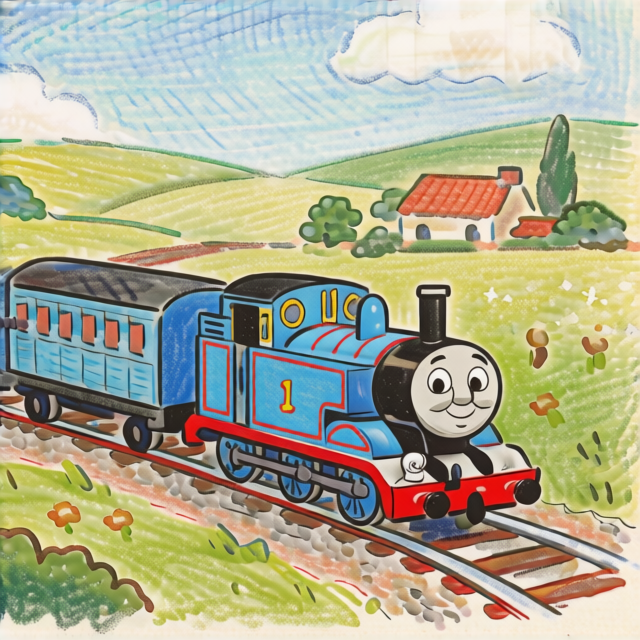
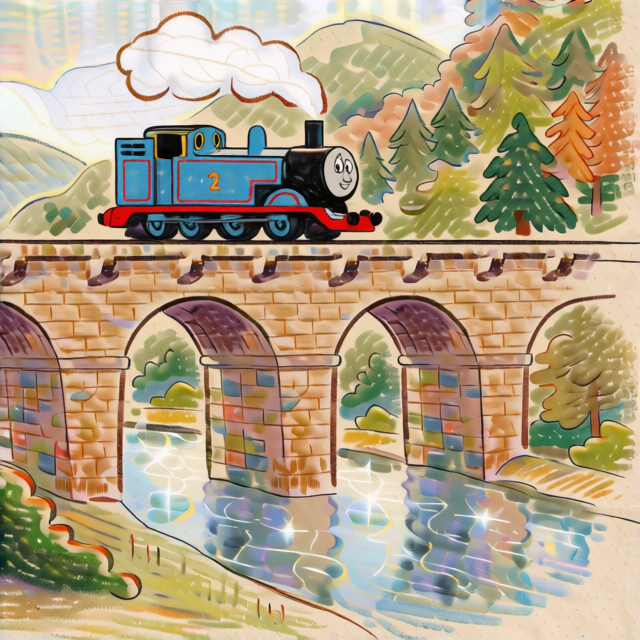
Three frames generated with a “hand-drawn colored pencil” style prompt. 640×640, 20 refinement steps, Euler sampler, no LoRAs.

Three steps to your first image
The one-step script handles everything from the CUDA check through building stable-diffusion.cpp and a test generation. Budget 15–30 minutes, mostly download and compile time.
1. Get the setup script
Linux:
Download krea2_pascal_setup.sh
chmod +x krea2_pascal_setup.sh && ./krea2_pascal_setup.shRequires an NVIDIA driver and sudo for system packages.
Windows (PowerShell as Administrator):
Download krea2_pascal_setup.ps1
Set-ExecutionPolicy -Scope Process -ExecutionPolicy Bypass
.\krea2_pascal_setup.ps1
Installs VS Build Tools, CMake, and Miniconda automatically.
Building by hand? The one flag that matters on Pascal is the CUDA architecture target. Without it, the binary compiles fine and runs — on the CPU, at ~20 minutes per frame, with no error message:
cmake -B build -DCMAKE_BUILD_TYPE=Release -DGGML_CUDA=ON \
  -DCMAKE_CUDA_ARCHITECTURES="61"
cmake --build build --config Release -j$(nproc)
# Binary at: build/bin/sd-cli
Full manual install (system deps, Miniconda) is in the script. The FAQ explains why this flag is invisible if you miss it.
2. Download the models
Three files, ~7.1 GB total. Pull them straight from HuggingFace into the paths below:
mkdir -p ~/models/krea2 ~/models/vae ~/models/text-encoders

# Krea 2 Turbo diffusion model — Q2_K GGUF (~4.55 GB)
curl -L -C - --progress-bar -o ~/models/krea2/krea2_turbo-Q2_K.gguf \
  https://huggingface.co/vantagewithai/Krea-2-Turbo-GGUF/resolve/main/krea2_turbo-Q2_K.gguf

# Qwen3-4B text encoder — Q4_K_M GGUF (~2.33 GB)
curl -L -C - --progress-bar -o ~/models/text-encoders/Qwen3-4B-Instruct-2507-Q4_K_M.gguf \
  https://huggingface.co/lmstudio-community/Qwen3-4B-Instruct-2507-GGUF/resolve/main/Qwen3-4B-Instruct-2507-Q4_K_M.gguf

# qwen_image VAE — safetensors (~242 MB)
curl -L -C - --progress-bar -o ~/models/vae/qwen_image_vae.safetensors \
  https://huggingface.co/Comfy-Org/Qwen-Image_ComfyUI/resolve/main/split_files/vae/qwen_image_vae.safetensors
The diffusion repo (vantagewithai/Krea-2-Turbo-GGUF) carries the full quant ladder — Q2_K through Q8_0 — if you want to trade VRAM for quality on a larger card. The text encoder stays on the CPU at run time (--backend "llm=cpu"), so only ~4.8 GB of the 7.1 GB ever touches VRAM. The setup script downloads all three for you.
3. Run your first image
fuser ships in the psmisc package, which isn’t installed on a minimal Ubuntu image. If fuser: command not found, run sudo apt install psmisc first (the setup script does this for you).
# Clear any lingering GPU processes first
fuser /dev/nvidia* 2>/dev/null | xargs -r kill 2>/dev/null
sleep 2

~/stable-diffusion.cpp/build/bin/sd-cli \
  --diffusion-model ~/models/krea2/krea2_turbo-Q2_K.gguf \
  --vae ~/models/vae/qwen_image_vae.safetensors \
  --llm ~/models/text-encoders/Qwen3-4B-Instruct-2507-Q4_K_M.gguf \
  --backend "llm=cpu" --vae-tiling --diffusion-fa \
  --cfg-scale 1.0 --steps 20 --sampling-method euler \
  -H 640 -W 640 --seed 42 \
  --output ~/test.png \
  -p "A cute robot painting a picture in a garden, \
Pixar style 3D render, Disney CG animation, \
cinematic lighting, subsurface scattering, \
detailed textured skin, volumetric rim light, \
cgi film still, highly detailed, sharp focus"
This takes roughly 2.5 minutes — about 145–155 s on a GTX 1070, depending on thermals and what else is on the card. A 640×640 PNG with no errors means you’re set:
file ~/test.png # should say "PNG image data, 640 x 640"Want to be sure the GPU did the work and not the CPU? Run watch -n 0.5 nvidia-smi in a second terminal during generation — you should see sd-cli holding ~4.9 GB of VRAM with GPU-Util above 0%. If VRAM stays near zero, the build is silently on the CPU (see the FAQ on the architecture flag).
Working prompts for Pascal
The full prompts and seeds for the three Thomas frames above. The scene description and style are separated by a comma — this matters because the text encoder treats them as distinct concepts.
The style suffix
hand drawn colored pencil illustration, soft textured paper grain,
visible pencil strokes and crosshatching, crayon texture,
childrens book illustration, warm earth tones, sketchbook quality,
soft shading, gentle color palette, storybook style, cozy nostalgic feel
Frame prompts
| Frame | Seed | Scene prompt (before the style suffix) |
|---|---|---|
| 1 | 1001 | Thomas the Tank Engine pulling blue Annie and Clarabel carriages along a railway track through the green countryside of Sodor, rolling hills and meadows, blue sky with fluffy clouds, distant farmhouse |
| 2 | 1002 | Thomas the Tank Engine parked at Tidmouth engine sheds roundhouse with other steam engines, Gordon the big blue engine, James the red engine, Percy the little green engine, railway yard setting |
| 3 | 1003 | Thomas the Tank Engine crossing a stone railway viaduct bridge over a sparkling river in Sodor, forested hills in background, steam puffing from funnel, sunny day |
Style tips: Longer prompts (~40 words for colored pencil vs ~27 for Pixar) don’t cost VRAM since the text encoder is on CPU. Append style with a , (comma+space) separator. Without the comma, the text encoder fuses the scene and style into a single run-on concept.
What you get on a 2016 GPU
The 20-step refinement phase is memory-bandwidth-bound. The GTX 1070’s 256 GB/s GDDR5 runs at ~6.9 seconds per step. An RTX 3060 Ti (448 GB/s GDDR6) runs at ~3–4 seconds — roughly 2× faster for the same quality.
| Metric | GTX 1070 | RTX 3060 Ti |
|---|---|---|
| Memory bandwidth | 256 GB/s | 448 GB/s |
| Refinement speed | ~6.9 s/it | ~3-4 s/it |
| Frame time (20 steps) | ~155 s | ~80 s |
| Diffusion throughput | ~3.75 GB/s | ~7+ GB/s |
Tuning frame time: The --steps N flag controls only the refinement phase. Lower it to 10 for ~90 s frames (lower quality), or raise it to 30–40 for better quality at ~200–270 s. The 430 internal diffusion steps are fixed by the model and don’t change with this flag.
Troubleshooting & the Pascal traps
Everything that cost hours of trial and error, collapsed. Open what you need.
Why does it take 155 seconds? What are the phases?
One frame runs through five phases. Knowing them helps you read the progress bars and spot where a failure happened:
| Phase | Steps | Time | What it does |
|---|---|---|---|
| 1. Model load | 386 tensors | ~1.3 s | Load Krea2 weights + VAE + LLM into VRAM/RAM |
| 2. Text conditioning | — | ~2.7 s | Qwen3-4B encodes your prompt (on CPU) |
| 3. Internal diffusion | 430 steps | ~20 s | Fixed by model architecture — raw latent generation |
| 4. Refinement | 20 steps | ~138 s | --steps 20 controls this. ~6.9 s/it on Pascal |
| 5. VAE decode | 16 tiled steps | ~14 s | Decodes latent to 640×640 PNG |
Phase 4 dominates, and it’s the only one --steps changes. The 430 internal steps in phase 3 are fixed by the model.
cudaMalloc: out of memory during generation
Newer GPUs page memory between CPU and GPU under pressure via cudaMallocManaged. Pascal has no such fallback — the allocation just fails, opaque and final. Work through this list:
- Kill all GPU processes:
fuser /dev/nvidia* | xargs kill - Wait 3 seconds, then confirm
nvidia-smishows < 100 MiB used - Close browser tabs, games, or any GPU-accelerated apps
- Verify you did not add
--params-backend cpuor--offload-to-cpu(see below) - Running multiple frames in a script? Make sure each
sd-cliinvocation starts fresh — don’t reuse a long-running process
Build succeeds but runs on CPU (the CMAKE_CUDA_ARCHITECTURES flag)
cmake auto-detect skips Pascal (CC 6.1) because the default targets are CC 7.0+. Your binary compiles, links, and runs without errors — at CPU speeds, ~20 minutes per frame. There’s no warning. Rebuild with the architecture flag:
cmake -B build -DCMAKE_BUILD_TYPE=Release -DGGML_CUDA=ON \
  -DCMAKE_CUDA_ARCHITECTURES="61"
Verify the build output shows sm_61 in the compiler flags, not sm_70 or sm_75. Also confirm your library path includes the CUDA libraries:
export PATH=~/miniconda/bin:$PATH
export LD_LIBRARY_PATH=~/miniconda/lib:~/miniconda/targets/x86_64-linux/lib:$LD_LIBRARY_PATH
The --params-backend cpu / --offload-to-cpu trap
You’d think offloading model weights to CPU RAM would help an 8 GB GPU. On Ampere it does. On Pascal it causes an instant OOM: the refinement phase tries to allocate a second 4.6 GB workspace in VRAM, and with weights already evicted, the workspace can’t reuse their memory region.
The fix: let weights load into VRAM (~4613 MB). The compute workspace reuses the same memory. Counterintuitive, but it’s the only way it works — do not pass --offload-to-cpu or --params-backend cpu.
Memory fragmentation — free VRAM but allocation still fails
On Pascal, even after nvidia-smi shows 8 GB free, the driver may not be able to allocate a contiguous 4.6 GB block. Fragmentation from zombie CUDA contexts is invisible and persistent. On Ampere the driver coalesces free pages and remaps virtual addresses transparently; Pascal does not.
Practical consequences on the GTX 1070:
- Kill GPU processes between runs:
fuser /dev/nvidia* | xargs kill - Any leftover process fragments memory
- Even Xorg (50 MiB) can break the contiguous allocation
SSH session kills the batch after a few frames
A foreground SSH session drops after ~3 minutes of no stdout, and the sd-cli process inside it gets killed. Always detach with nohup or a background terminal:
ssh user@host 'nohup bash generate.sh > run.log 2>&1 & echo PID=$!'Generation completes but no file appears
sd-cli prints “DONE” even when VAE decode fails after diffusion. Check the full log for lines containing [ERROR]. The most common cause is an OOM during the refinement-to-VAE transition — see the cudaMalloc item above.
sd.cpp vs the prism fork — which do I build?
Krea 2 Turbo needs upstream stable-diffusion.cpp, not the prism fork or llama.cpp. The prism fork does not support the Krea2 architecture. The sd-cli binary is separate from llama.cpp and the two don’t share model files.
Going further
The setup script and sample prompts above are enough to start generating. For multi-frame storyboard sequences (10–100+ frames with narrative structure), check the full storyboard pipeline skill in the Hermes Agent skill library.
For more frames in the colored pencil style, vary the seeds and scene descriptions in the same prompt structure. The style suffix stays the same across all frames for consistency.